
Since AI Trade Pal launched, many users have said, “The copy generated in 30 seconds is better than what I write myself.”
But some have asked: How does Expert Rewrite work? Where can I find my saved copy? What are the member benefits?
This tutorial with 5 screenshots will teach you everything in 5 minutes.
Part 1: Fill in Product Information (Main Interface)
Open the AI Trade Pal homepage and you’ll see this main interface.
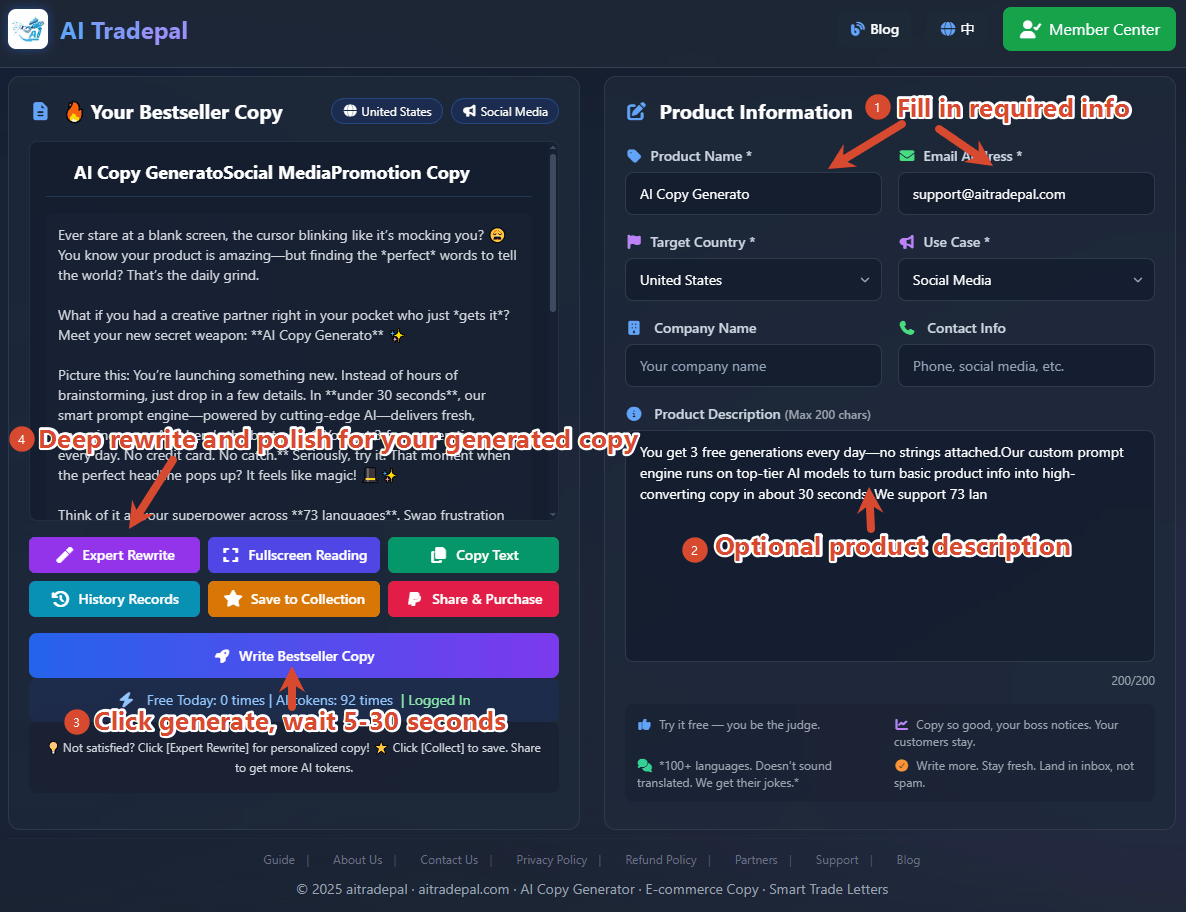
Form Instructions:
| Field | Description | Example |
|---|---|---|
| Product Name | Required, product name | Silicone Baking Mat |
| Email Address | Required for saving | your@email.com |
| Target Country | Required, which market | USA / Germany / Japan |
| Use Case | Required, scenario | Trade Letter / E-commerce |
| Company Name | Optional | XYZ Global Trading |
| Contact Info | Optional | TEL12345678 |
| Product Description | Optional, key features, benefits (max 200 chars) | Non-stick, reusable, heat-resistant up to 480°F |
💡 Tip: The more detailed your product description, the more accurate the AI generation. For example, don’t just write “baking mat” — write “food-grade silicone, heat-resistant to 480°F, dishwasher safe.”
Generate Results in 30 Seconds
After confirming your information, click the “Generate” button.
AI will generate copy in 30 seconds. You can copy it directly or continue optimizing.
🎁 Free Credits: Every user gets 3 free generations per day. For more:
- Click the “Share & Buy” button to invite friends — both get bonus credits
- Or purchase a premium package
Part 2: Expert Rewrite (Create Your Own Viral Copy) 「Login Required」
If the generated result is close to perfect but needs fine-tuning, use the “Expert Rewrite” feature.
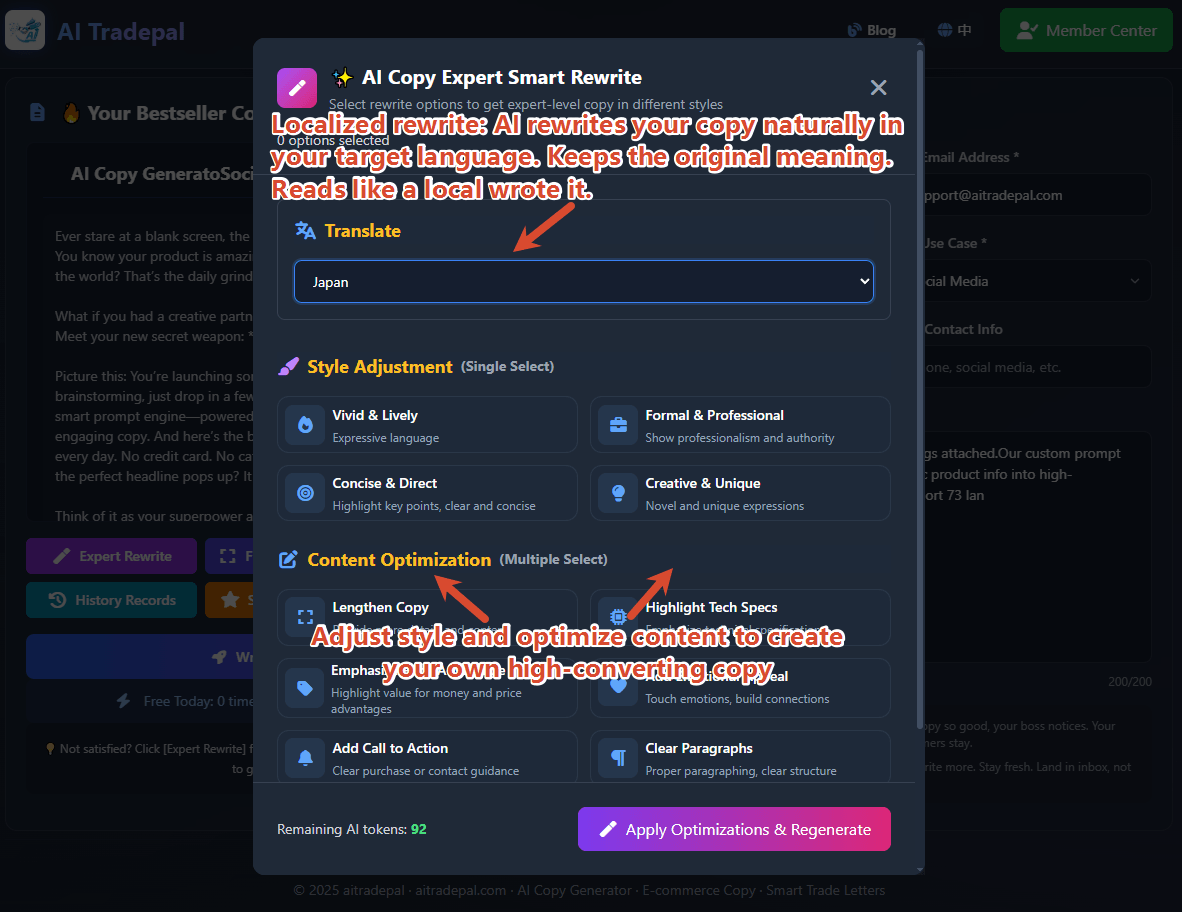
How to use:
- Click the “Expert Rewrite” button below the copy
- Translate copy: Rewrite the generated content with native expressions in the target language — keeps the meaning, sounds natural, great for multi-market sellers
- Select modification options (e.g., “lively tone”, “add call to action”)
- AI regenerates based on your requirements
Part 3: Save to Favorites 「Login Required」
Happy with the copy? Click “Save to Favorites” to store it for future use.
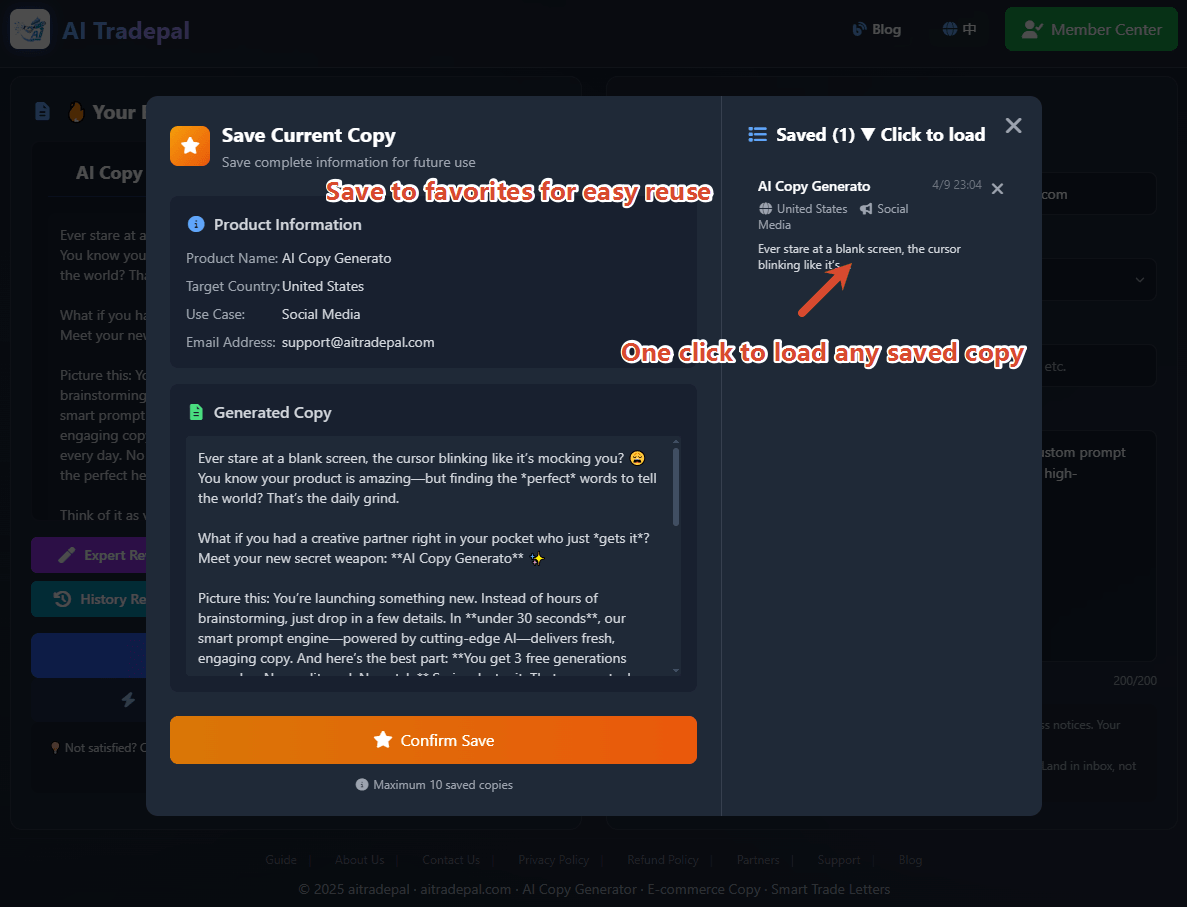
Where to find saved copy?
- Click the “Saved Copy” button on the main page
- Go to the “Favorites” section
- All saved copy is here — click to load, edit, copy, or delete
💡 Tip: The save feature is perfect for:
- Organizing copy for multiple products
- A/B testing different versions
- Sharing quality copy with your team
Part 4: Share & Earn Rewards 「Login Required」
Register now to unlock more features → lock in your referral link → start earning!
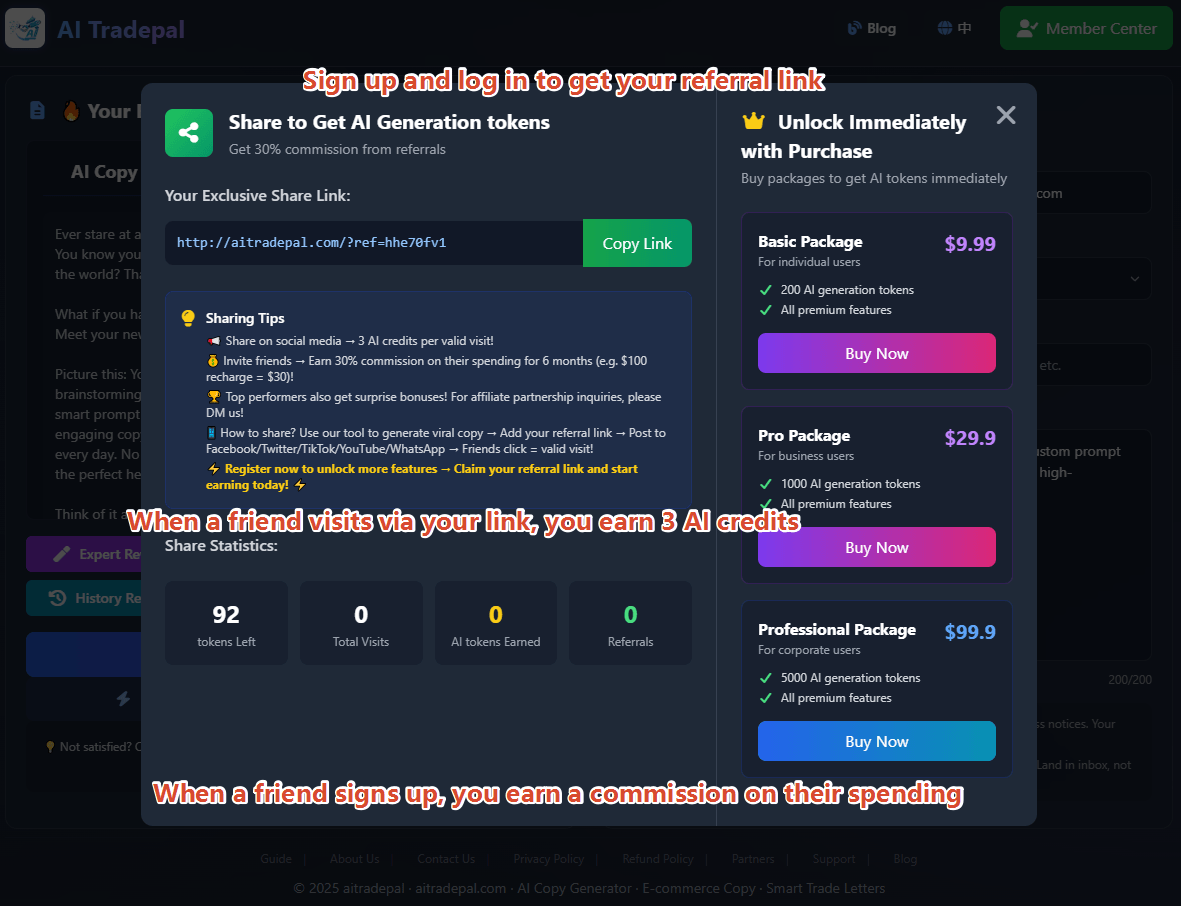
How to share:
- Click the “Share & Buy” button on the main page
- Generate viral copy with our tool → attach your unique referral link → share to Twitter, LinkedIn, Facebook, Email, or WhatsApp → each click counts as valid traffic
- Friends who register through your link earn rewards for both of you!
🎁 Rewards: Each valid visit earns you 3 AI generation credits. Long-term commission: 30% of your referral’s spending for 6 months (e.g., ¥100 recharge = ¥30 for you)
Part 5: Member Center (Your Personal Dashboard)
Registration is highly recommended — takes just 30 seconds to become an affiliate.
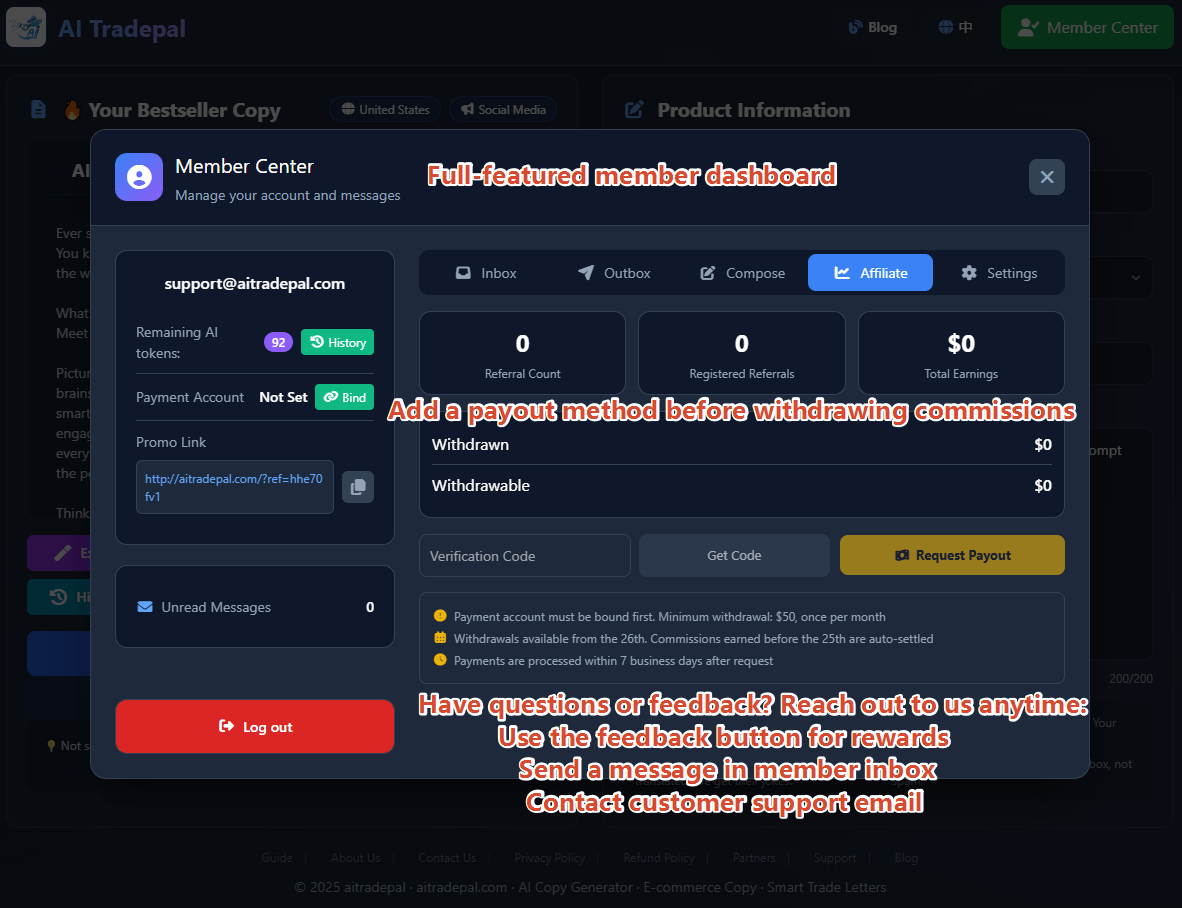
Member Benefits:
| Benefit | Description |
|---|---|
| Expert Rewrite | Optimize to create your own viral copy |
| History Saved | All generated copy automatically saved |
| Save to Favorites | One-click save, access anytime |
| Referral Commission | Earn steady commission from referred users |
🚀 Core Advantages:
- Proprietary core prompts + world-leading AI models
- Generates human-like viral copy in 30 seconds
- Supports 100+ languages with natural phrasing
- Deeply adapted to local reading habits — not stiff translation, but authentic localized marketing
The biggest feedback from users: The time saved helps you acquire several more clients.
| Your Problem | How This Tool Helps |
|---|---|
| Don't know how to write Amazon descriptions | Generate 5 versions in 30 seconds |
| Trade letters get no replies | Localized content by country/culture |
| Struggle with multilingual copy | 100+ languages, no translation awkwardness |
| Writing copy takes too much time | Save 2 hours every day for other tasks |
Try it free — you decide if it’s good!
👉 Click here to generate your first AI copy in 30 seconds
Questions or suggestions? Contact us via “Contact Us”, “Support Center”, or the feedback button.
📹 Video Tutorial
📝 Originally published on AI Trade Pal Blog
🔗 Original link: https://aitradepal.com/blog/en/ai-copy-generator-guide-en
📄 Reproduction must retain original link. Modification for commercial use is prohibited.